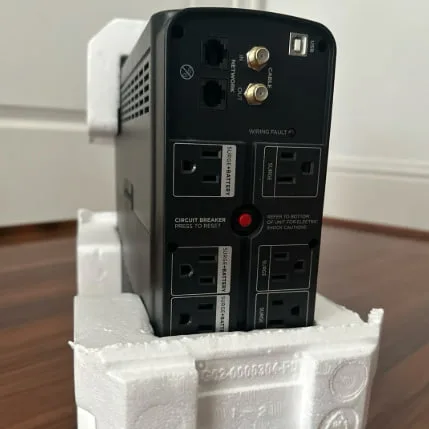
The CyberPower CP1500PFCLCD is the best UPS battery backup for a serious U.S. home office. The APC Back-UPS Pro BR1500MS2 is the strongest alternative if you prefer APC's ecosystem and slightly lower 900W output is enough.
A UPS gives you time. It does not give you a normal workday during a blackout. The useful goal is to keep a desktop, monitor, router, and NAS alive long enough to save files, finish a critical upload, or shut down cleanly.
Amazon availability and both ASINs were checked directly on August 6, 2026. Prices are intentionally not printed because they change. Use the links for the current U.S. offer.
Quick picks
| Model | Capacity | Battery outlets | Best for |
|---|---|---|---|
| CyberPower CP1500PFCLCD | 1500VA / 1000W | 6 battery plus surge | Higher-power desktop and NAS setups |
| APC BR1500MS2 | 1500VA / 900W | 6 battery plus surge | Buyers who prefer APC software and support |
Best overall: CyberPower CP1500PFCLCD
The CyberPower CP1500PFCLCD is a line-interactive, sine-wave UPS rated at 1500VA and 1000W. The manufacturer lists 12 total NEMA 5-15R outlets, split into six battery-backed outlets and six surge-only outlets.
It also includes automatic voltage regulation, a multifunction LCD, USB communication, network-line protection, and USB-A plus USB-C charging. The battery is user replaceable.
CyberPower's official runtime figures list about 10 minutes at half load and 2.5 minutes at full load. Those figures are useful boundaries, not promises for your exact PC. Battery age, temperature, power factor, and connected equipment change runtime.
Choose it for:
- A desktop with an active-PFC power supply
- One or two monitors, depending on total load
- A router, modem, and network switch
- A two-bay or four-bay NAS
- Automatic USB shutdown on a supported computer or NAS
The higher 1000W rating gives it more breathing room than the APC model. Do not treat 1000W as a target. Leaving headroom reduces overload risk and gives better runtime.
Check the CyberPower CP1500PFCLCD on Amazon US
Best APC alternative: APC Back-UPS Pro BR1500MS2
The APC BR1500MS2 is rated at 1500VA and 900W. APC lists 10 NEMA outlets, automatic voltage regulation, an LCD, data-line protection, USB-A and USB-C charging, audible alarms, and a user-replaceable battery.
APC has a long-established home and business UPS ecosystem. Some buyers prefer its PowerChute management workflow and replacement-battery availability. The 900W limit is lower than the CyberPower's, but it remains sufficient for many workstations that draw far less than their power supply's printed maximum.
Choose it for:
- A normal desktop and one or two efficient monitors
- Router and modem uptime during short interruptions
- A NAS that supports USB UPS communication
- A buyer who already uses APC hardware or software
Check the APC BR1500MS2 on Amazon US
How to size the UPS correctly
Do not add the wattage printed on every power adapter. Measure actual load if possible with a plug-in power meter, or use reliable device measurements.
Add the equipment that truly needs battery power:
- Computer at a realistic heavy workload
- Monitor
- Router and modem
- Network switch
- NAS during drive activity
Then choose a UPS whose watt rating is comfortably above that figure. A setup drawing 450W will have much more useful runtime on a 900W or 1000W unit than a setup drawing 800W.
The VA rating and watt rating both matter. For ordinary buyers, the simplest rule is never exceed either, and leave headroom below the watt limit.
Battery-backed versus surge-only outlets
Use battery-backed outlets for devices that must remain on long enough to save or shut down. Use surge-only outlets for accessories that can lose power immediately.
Good battery candidates:
- Desktop computer
- Main monitor
- Router and modem
- NAS
- Small network switch
Good surge-only candidates:
- Speakers
- Desk lamp
- Secondary monitor if runtime is more important
- Nonessential chargers
Do not put a laser printer, heater, shredder, vacuum, or other high-surge appliance on the battery output unless the UPS manufacturer explicitly permits it. Laser printers are famous for making a modest UPS reconsider its life choices.
Set up automatic shutdown
Connect the UPS data port to the computer or NAS and install supported management software. Configure shutdown with enough remaining runtime to close applications and finish disk writes.
For a NAS, check the vendor's UPS compatibility and network UPS support. A NAS does not replace a backup, and a UPS does not protect against accidental deletion, theft, malware, or a dead storage pool.
Test the shutdown process during a controlled maintenance window. Do not wait for a thunderstorm to discover the USB cable was decorative.
Battery care and safety
Keep the UPS in a ventilated location. Heat shortens sealed lead-acid battery life. Do not cover vents or place the unit where water can reach it.
Run periodic self-tests and note whether runtime has fallen. Replace batteries with the correct cartridge. Recycle old batteries through an appropriate retailer or local program rather than placing them in household trash.
A plug-in UPS provides point protection. Homes with frequent surges, damaged wiring, or power-quality problems should involve a licensed electrician and may benefit from whole-home surge protection.
Final verdict
Buy the CyberPower CP1500PFCLCD for the best balance of 1000W capacity, sine-wave output, AVR, outlets, and current home-office features. Buy the APC BR1500MS2 if you prefer APC's management ecosystem and 900W is enough for your measured load.
Whichever model you choose, use it to save work and shut down. A UPS is a very useful parachute, not a tiny power plant.
If you need hours of mobile or emergency runtime rather than a few minutes for orderly shutdown, compare portable power stations for remote work instead.